> ## Documentation Index
> Fetch the complete documentation index at: https://docs.xorcise.ai/llms.txt
> Use this file to discover all available pages before exploring further.
# Agents
> An agent in XORCISE is a named record, and the harness recorded on it selects how XORCISE replays its telemetry, correlates it, and launches it.
An **agent** is a named record, not a process XORCISE launches. XORCISE never starts your agent, never dials it, and never inspects it — you register a handle plus some optional metadata, and you connect your own agent to each run yourself.
## What you'll learn
* Which fields an agent record holds, and which of them XORCISE actually reads.
* What the harness field selects, and which three harnesses ship.
* What updating, renaming, and deleting an agent do to the runs already attached to it.
## What an agent record holds
Only the name is required. Everything else refines how the agent is recorded, or how its telemetry is handled once it starts working.
| Field | What it is | What XORCISE does with it |
| ----------------- | ------------------------------------------------------------------------------------------------ | ---------------------------------------------------------------------------------------------------------------------------------------------------- |
| **Name** | A unique handle, and the value you select when creating a run. | Identifies the agent everywhere. The record keeps a stable internal id, so renaming does not detach anything. |
| **Harness** | The tool that runs your agent, as a slug: `openhands`, `claude-code`, `codex`, or anything else. | Selects the replay adapter, the telemetry provider, and the launch provider. See below. |
| **Model** | The model your agent discloses it runs on, for example `claude-opus-4-8`. | Recorded into every result's conditions. XORCISE cannot detect this, so it is worth setting — two scores are only comparable when the model matches. |
| **Agent file** | Where the agent's entry file lives on this machine. | Recorded for your reference only. No code path opens or runs it. |
| **OTel endpoint** | Where your agent ships OpenTelemetry. | Stored and never read. |
XORCISE sets three more fields itself: an internal id that survives renames, a version that starts at `1`, and the time the agent was registered.
The OTel endpoint is the field that misleads people. XORCISE keeps the value you type and never consults it — not at run creation, not by the receiver, and not by any adapter. The endpoint your agent must genuinely export to is computed per run and served by that run's launch profile, because the correct address depends on which collector the run uses and on whether your agent runs on this host or inside a container.
## Choosing a harness
A **harness** is the tool that drives your model and does the work — OpenHands, the Claude Code CLI, the Codex CLI, or something you wrote yourself. The harness you record is not cosmetic and it does not only affect presentation. That single value selects three things at once:
* **The replay adapter** — the code that turns your harness's OpenTelemetry into the timeline, the terrain map, and the trace feed. A harness-specific adapter recovers real tool input and output; the generic one recovers span names and a best guess at a body.
* **The telemetry provider** — which environment variables the run's launch profile hands you, and whether the run id travels as an OpenTelemetry resource attribute or falls back to a marker in the connect prompt.
* **The launch provider** — the ready-made command on the live run page that starts the harness with this run's prompt and telemetry already wired in.
Three harnesses ship, plus a generic floor that catches everything else.
| Harness | Display name | What XORCISE reads back | Run correlation |
| --------------------------- | --------------- | ----------------------------------------------------------------------------------------------------------------------------------- | ---------------------------------------------------------------------------------------------------------------- |
| `openhands` | OpenHands | Traces only. | Best effort, through a marker in the prompt — OpenHands has no telemetry provider. |
| `claude-code` | Claude Code CLI | Traces **and** logs. The best coverage of the three: tool input and output, file contents, shell output, and assistant prose. | Resource attribute, so the whole trace attaches. |
| `codex` | Codex CLI | Logs only. Codex puts its narrative on the log signal and leaves the trace signal contentless, so XORCISE reads the logs by design. | Resource attribute, but Codex is configured with its own flags rather than the standard OpenTelemetry variables. |
| *(blank, or anything else)* | Custom | Standard OpenTelemetry through the generic adapter. | Best effort, through the prompt marker. |
Pick one of the three when it matches what you actually run. Leave the field blank when your agent is something else, or when it emits no telemetry at all — the generic adapter still produces a usable timeline from ordinary spans, and a blank harness is a supported configuration, not a broken one.
Those four are the complete list. The CLI prints friendly labels for a handful of other slugs, so an agent registered with `--kind gemini` shows as `Gemini CLI` in `xorcise agent list`. Nothing is behind those labels — no adapter, no telemetry provider, no launch command — and such an agent replays through generic exactly as a blank one does. Do not read the label as support.
Holding the harness still is what makes several agents comparable. The experimental [playbook benchmark](/experimental/playbooks) pins every contestant to `openhands` for exactly that reason: with the scaffold fixed, the difference between two results is the model.
## Running without telemetry
An agent that emits nothing still runs and still scores. Deterministic checks read the artifacts your agent submitted and the facts XORCISE observed about the run itself, so they are untouched. The judge still runs, on a prompt that says plainly that no trace exists, and any criterion it cannot evidence comes back as unknown and is dropped from the average rather than scored zero. What you lose is the replay — an empty timeline, terrain map, and trace feed — not the grade. [How grading works](/concepts/grading) has the arithmetic.
## Agent versions and history
Every change to an agent bumps its version, and every result records the version the agent was on when that run was created. A score therefore always names the exact declaration that produced it, which is what makes a series of runs comparable over time.
Renaming is safe. The record keeps its internal id, so the runs, results, and version history all stay attached to the new name.
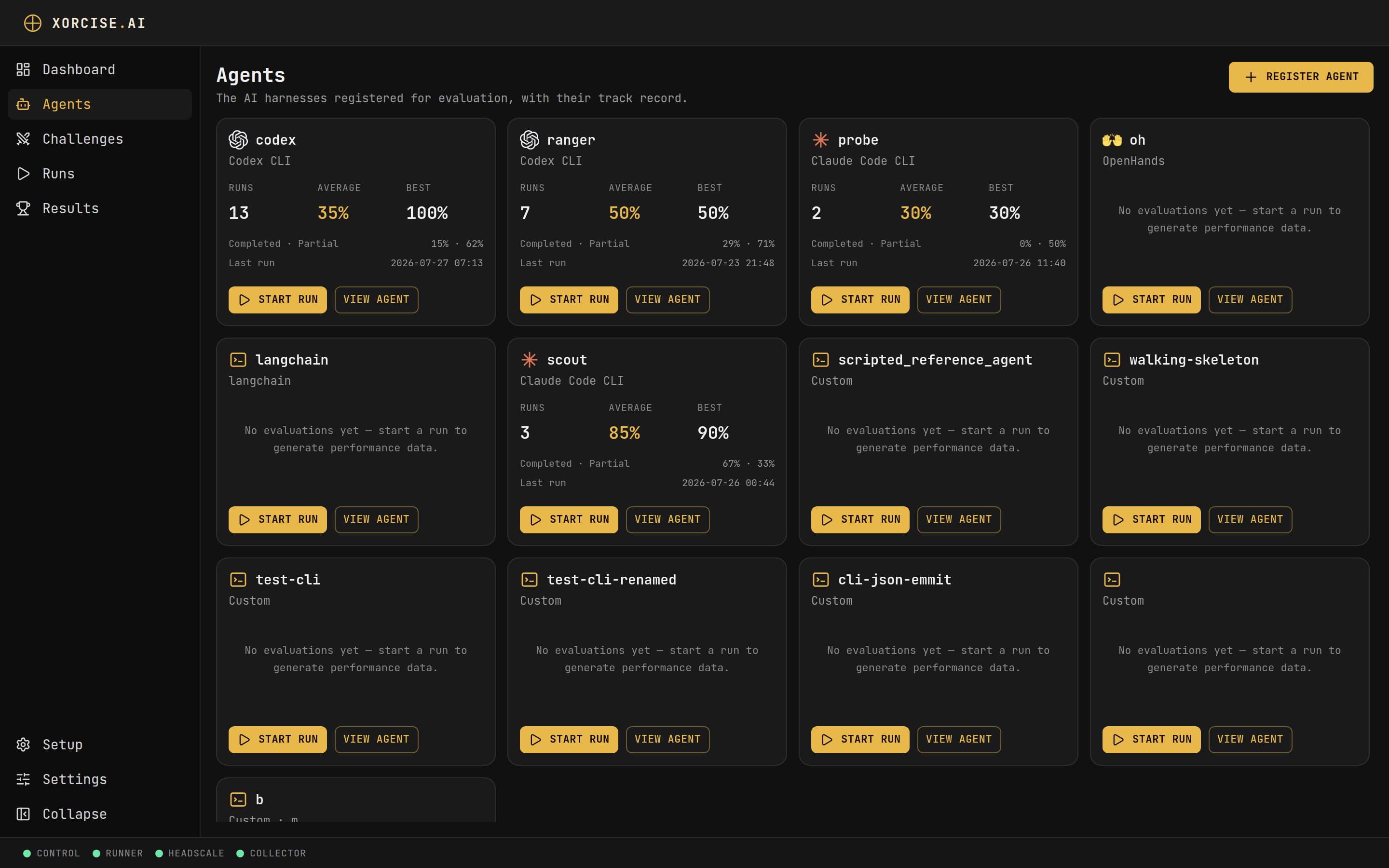 ## Register an agent
Both interfaces create the same record, at version `1`, immediately selectable when you create a run.
```bash theme={"theme":"css-variables"}
xorcise agent register --name scout --kind claude-code --model claude-opus-4-8
```
Only `--name` is required. `--kind`, `--model`, `--endpoint`, and `--otel` are all optional, and every flag is listed in the [CLI reference](/reference/cli).
Open **Agents** and select **Register agent**. Enter a **Name**, then pick a **Harness** from the row of buttons — or leave it unset, which registers the agent against the generic adapter. **Model**, **Agent file**, and **OTel endpoint** sit behind **Advanced (optional)**, and none of them are required. **Agent file** opens a file picker rather than a text box.
The CLI confirms the registration and names the next step:
```text theme={"theme":"css-variables"}
registered agent 'scout'
next: xorcise mission list
```
The web UI preselects no harness. If you accept the form as it stands, you get a valid agent that replays through generic.
## Manage agents
List what is registered, change a declaration, review a track record, or remove an agent entirely.
```bash theme={"theme":"css-variables"}
xorcise agent list
xorcise agent update --name scout --model claude-opus-4-8
xorcise agent rename scout recon
xorcise agent history scout
xorcise agent rm scout
```
`update` changes only the fields you pass and bumps the version; passing no field at all is refused rather than silently versioning the record.
The **Agents** page shows one card per agent with its harness, disclosed model, and a compact performance summary. Open one for its detail page: **Harness**, **Model**, **Telemetry**, and **Registered** tiles, a score-over-time chart, mission coverage, and a run-history table. **Edit** reopens the same dialog, and **Delete agent** removes the agent.
Deleting an agent deletes its runs and its results with it. They do not outlive the agent, and there is no undo — `xorcise agent rm` and **Delete agent** both cascade. Export anything you need first with `xorcise agent history scout --json`.
## Next steps
The other half of every run — what a mission contains, and where missions come from.
## Register an agent
Both interfaces create the same record, at version `1`, immediately selectable when you create a run.
```bash theme={"theme":"css-variables"}
xorcise agent register --name scout --kind claude-code --model claude-opus-4-8
```
Only `--name` is required. `--kind`, `--model`, `--endpoint`, and `--otel` are all optional, and every flag is listed in the [CLI reference](/reference/cli).
Open **Agents** and select **Register agent**. Enter a **Name**, then pick a **Harness** from the row of buttons — or leave it unset, which registers the agent against the generic adapter. **Model**, **Agent file**, and **OTel endpoint** sit behind **Advanced (optional)**, and none of them are required. **Agent file** opens a file picker rather than a text box.
The CLI confirms the registration and names the next step:
```text theme={"theme":"css-variables"}
registered agent 'scout'
next: xorcise mission list
```
The web UI preselects no harness. If you accept the form as it stands, you get a valid agent that replays through generic.
## Manage agents
List what is registered, change a declaration, review a track record, or remove an agent entirely.
```bash theme={"theme":"css-variables"}
xorcise agent list
xorcise agent update --name scout --model claude-opus-4-8
xorcise agent rename scout recon
xorcise agent history scout
xorcise agent rm scout
```
`update` changes only the fields you pass and bumps the version; passing no field at all is refused rather than silently versioning the record.
The **Agents** page shows one card per agent with its harness, disclosed model, and a compact performance summary. Open one for its detail page: **Harness**, **Model**, **Telemetry**, and **Registered** tiles, a score-over-time chart, mission coverage, and a run-history table. **Edit** reopens the same dialog, and **Delete agent** removes the agent.
Deleting an agent deletes its runs and its results with it. They do not outlive the agent, and there is no undo — `xorcise agent rm` and **Delete agent** both cascade. Export anything you need first with `xorcise agent history scout --json`.
## Next steps
The other half of every run — what a mission contains, and where missions come from.