> ## Documentation Index
> Fetch the complete documentation index at: https://docs.xorcise.ai/llms.txt
> Use this file to discover all available pages before exploring further.
# Missions
> A mission is an environment plus the rules for grading it. XORCISE ships two types, lab and static, from your own bundle or the free library.
A **mission** is an environment plus the rules for grading it. The second half is the part people miss: alongside the vulnerable service or the packet capture, a mission carries the objective the agent is given, the artifacts it must submit, the criteria the judge scores against, and the checks XORCISE evaluates itself.
## What you'll learn
* What a mission carries, and which parts of it the score is built from.
* How a lab mission and a static mission differ, at ingest and at run time.
* Where missions come from, and what pulling one actually does.
## What is inside a mission
The grading parts come first, because they are the ones that decide a score.
* **Objective** — the task, written for the agent. XORCISE renders it into the connect prompt, substituting the resolved target address wherever the objective names one.
* **Expected artifacts** — what the agent must submit. The flag is an artifact named `flag`, nothing more; there is no separate flag field and no answer hash. Marking an artifact required changes the wording in the prompt, not the score.
* **Rubric** — the criteria the judge assesses, each with a weight.
* **Deterministic checks** — assertions XORCISE evaluates itself against the sealed run record.
* **Intel** — optional help the agent can ask for during a run. Which intel is available is decided per run, not by the mission.
* **Environment** — a compose file and the networks the agent may reach. Labs only.
* **Attachments** — companion files the mission ships. A static mission needs at least one.
* **Terrain** — the authored attack path: the hosts, the links between them, and which one holds the objective.
* **Catalog metadata** — summary, specialty, proficiency, skills, and technologies. These drive browsing, and the summary is deliberately never shown to the agent.
The rubric and the checks are the whole of the score, and how they combine is on [How grading works](/concepts/grading).
## Two types of mission
Every mission declares one of exactly two types, and the type is an execution class rather than a genre.
A **lab** ships an image and a compose file. Starting a run brings the environment up as containers and joins them to a network private to that run, so the agent works against a live target it reaches over the network.
A **static** mission has no image, no compose file, and no network. It ships at least one attachment — a capture, a binary, a disk image, a log bundle — and the agent works entirely from what it downloads.
| | Lab | Static |
| ----------------------- | -------------------------------------------------------------------------------- | -------------------------------------------------------------------- |
| The manifest declares | An `environment` block | At least one attachment, and no `environment` |
| Ingest | Builds a fused image | Builds nothing |
| Starting a run | Reserves a subnet, brings up containers, joins them to the run's private network | Starts nothing at all |
| The agent works against | Target addresses over that private network | The attachments it downloads |
| The connect prompt | Carries the join recipe and a targets section | Omits both, and run control becomes step one |
| Grading can read | Artifacts, trace statistics, and every observed fact including the network ones | Artifacts, trace statistics, and only the non-network observed facts |
Everything else is identical. Both types use the same run-control surface to submit artifacts, request intel, fetch attachments, and complete the run, and both are graded exactly the same way. An `environment` block left on a static manifest is warned about and ignored — it is never deployed.
## Where missions come from
There are two sources, and a mission belongs to exactly one of them for as long as it is installed. The XORCISE library is the source this release supports; **Your Own** is the source ingestion will populate once that capability ships.
| | The XORCISE library | Your own |
| ---------------- | -------------------------------------------------- | -------------------------------------- |
| Available today | Yes | No — coming soon |
| Where it lives | A hosted catalog | A bundle directory on this machine |
| How it arrives | `mission pull`, or automatically when a run starts | `mission ingest`, once ingestion ships |
| What it costs | Nothing | Nothing |
| Sign-in | None at all | Not applicable |
| Can you edit it | No | Yes: edit the bundle and re-ingest |
| Works offline | Once installed | Always |
| Where it appears | The **XORCISE Remote** tab | The **Your Own** tab, badged `custom` |
The library needs **no API key, no account, and no sign-in of any kind**. Connect it once and browse. Nothing about a run is uploaded when you pull; the traffic goes one way, and the mission then runs locally on your own machine.
 ## Browsing the catalog
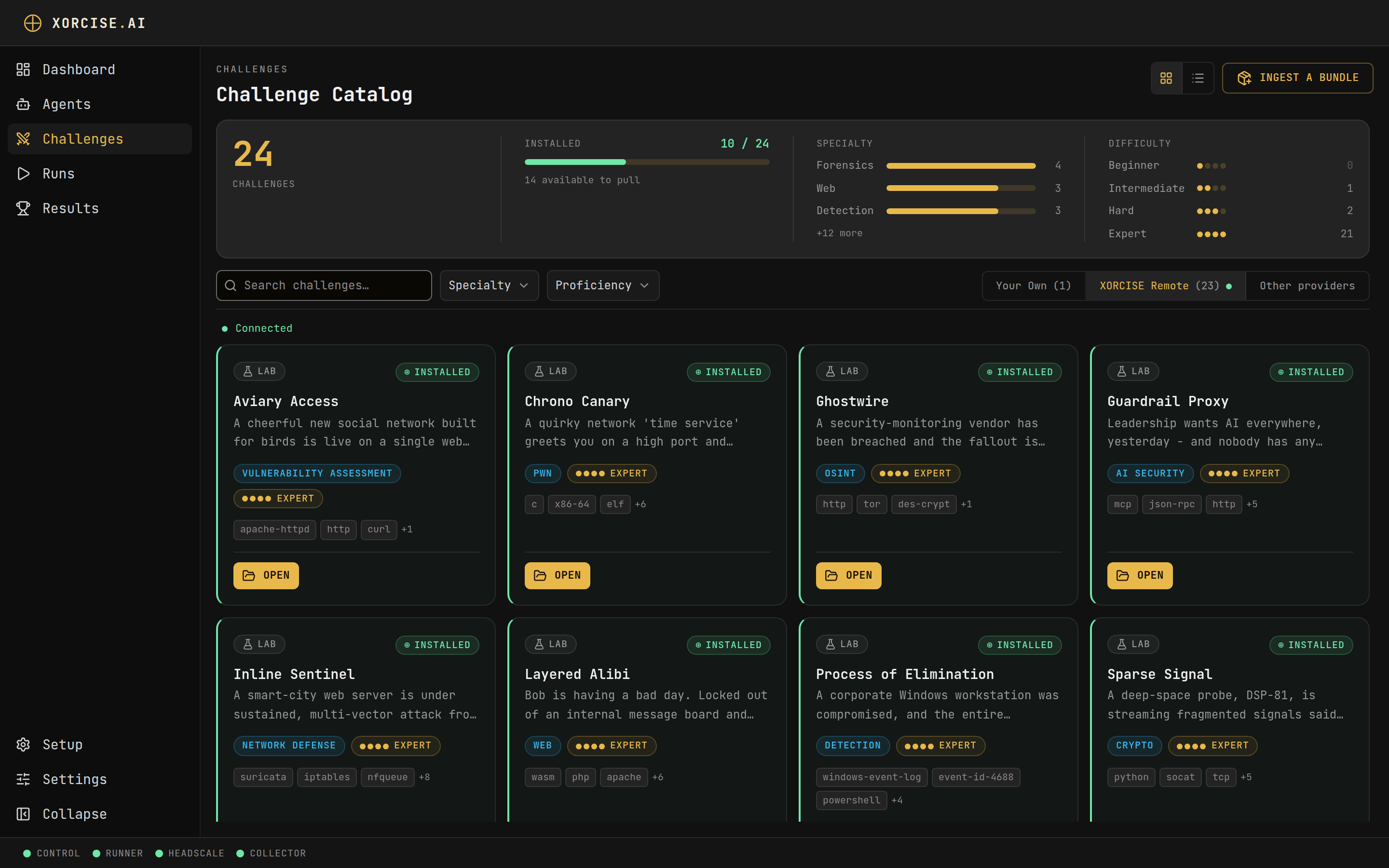
The catalog page opens on a library-stats strip: the total number of missions, how many of them are installed as `N / M` with a progress bar, how many remain to pull, the leading specialties as labelled bars, and all five proficiency tiers — Novice, Advance Beginner, Competent, Proficient, and Expert — each with a count. All five are always drawn, including any sitting at zero, so the ladder reads as a consistent scale.
Below that sits a sticky filter bar: a search box that matches name, summary, and id, then **Specialty** and **Proficiency** facets. Each facet lists its values with the number of missions behind them, and the semantics are what you would expect — several values inside one facet widen the results, while two active facets narrow them. Active filters appear as removable chips under a **Filtering by** label, and **Clear filters** resets them. A view toggle switches between the card grid and a denser list, and remembers your choice.
Every card carries the two badges you need before you commit to a pull: an environment badge reading **Lab** or **Static**, and a proficiency meter drawn as five pips rather than a colour. Alongside them sit the specialty, whether the mission is installed or available, and a `custom` badge on your own work.
Opening a mission shows its objective, its description, its skills and technologies, its expected artifacts, its rubric, its deterministic checks, its intel behind reveal controls, its attachments, and a preview of its terrain. The environment section names **Lab** or **Static** and one sentence explaining which — the compose file, the entry networks, and the image reference are deliberately not shown. Read the mission's own bundle if you need those.
## What a pull does
Pulling installs a library mission locally: it downloads the mission image, unpacks the delivery bundle including any attachments, and registers the manifest. XORCISE reports the work in phases, in this order: **Resolving…**, **Preparing image…**, **Downloading image…**, **Extracting image…**, **Downloading files…**, **Installing…**, and finally **Installed**.
A first pull downloads a whole container image and can take several minutes. Pulling the same mission again is a safe no-op. While a pull is running, **Cancel** stops it; a cancelled pull installs nothing and is not treated as a failure.
Layers Docker already has produce no byte progress, so the bar can sit still or a total can grow underneath it while the pull is entirely healthy. Read the phase caption, not the percentage — as long as it is advancing, so is the pull.
## Install a mission from the library
Both interfaces end with the mission installed and runnable.
```bash theme={"theme":"css-variables"}
xorcise mission pull chrono-canary
```
Progress prints per phase. Pressing Ctrl-C cancels the job on the server rather than orphaning it.
Open **Missions**, select the **XORCISE Remote** tab, and find the mission — the search box and the **Specialty** and **Proficiency** facets narrow the list. Select **Pull** on its card, or open the mission and use **Pull** there. Progress and **Cancel** appear in place.
You do not have to pull first. Creating a run against a mission that is not installed pulls it and then starts the run, and the New run form shows the same phases and the same **Cancel download**.
## Ingest your own bundle
**Coming soon.** Installing a mission from your own bundle is not enabled in this release. Neither user-facing path ingests anything yet: `xorcise mission ingest` prints a coming-soon notice and exits, and the **Ingest a bundle** button on the **Missions** page opens a preview of the feature instead of a directory picker. The bundle format is documented below and in full in the [mission manifest reference](/reference/mission-manifest) so you can prepare bundles ahead of the release. To get missions today, pull them from the free XORCISE library — `xorcise mission list` and `xorcise mission pull `, or the **XORCISE Remote** tab on the **Missions** page.
A bundle is a directory with a `mission.json` at its root. Ingesting will validate that manifest, build the image the environment describes, and install the result under **Your Own**.
The command still exists, but it is gated:
```bash theme={"theme":"css-variables"}
xorcise mission ingest ./sqli-login
```
Every form of it — with a path, or without one — currently prints the same notice and installs nothing:
```text theme={"theme":"css-variables"}
Ingesting your own mission bundle is coming soon.
For now, browse the published missions with xorcise mission list and install one with xorcise mission pull .
```
**Ingest a bundle** is still on the **Missions** page and still opens, but it opens a coming-soon preview of the feature rather than the **Pick the bundle directory** picker. Nothing is ingested.
When ingestion ships, a successful run will name the installed mission and the image it built:
```text theme={"theme":"css-variables"}
installed sqli-login (xorcise/mission-sqli-login:local)
```
The build will run on the server and stream its logs, and a real build takes a few minutes.
Ingest is also the validator. There is no scaffold command and no separate validate command, so an invalid manifest surfaces at ingest and nowhere earlier. Re-ingesting the same id from the same source bumps its version and swaps the install atomically, and grading always reads the installed copy — so editing a bundle will change nothing until it is ingested again.
To prepare one, follow [Author a mission](/guides/author-a-mission); every field is specified in the [mission manifest reference](/reference/mission-manifest).
## Remove a mission
```bash theme={"theme":"css-variables"}
xorcise mission delete chrono-canary
```
Add `--yes` to skip the confirmation prompt.
Open the mission from **Missions** and select **Delete**. An inline confirmation appears; choose **Yes, delete**.
Deleting uninstalls, and nothing more. The runs and results that used the mission are kept, and the built image stays in your local Docker store — so removing a mission never costs you a score you already earned. Pull it again to make it runnable once more.
## Next steps
Pair an agent with a mission, and follow the evaluation from creation to a sealed result.
## Browsing the catalog
The catalog page opens on a library-stats strip: the total number of missions, how many of them are installed as `N / M` with a progress bar, how many remain to pull, the leading specialties as labelled bars, and all five proficiency tiers — Novice, Advance Beginner, Competent, Proficient, and Expert — each with a count. All five are always drawn, including any sitting at zero, so the ladder reads as a consistent scale.
Below that sits a sticky filter bar: a search box that matches name, summary, and id, then **Specialty** and **Proficiency** facets. Each facet lists its values with the number of missions behind them, and the semantics are what you would expect — several values inside one facet widen the results, while two active facets narrow them. Active filters appear as removable chips under a **Filtering by** label, and **Clear filters** resets them. A view toggle switches between the card grid and a denser list, and remembers your choice.
Every card carries the two badges you need before you commit to a pull: an environment badge reading **Lab** or **Static**, and a proficiency meter drawn as five pips rather than a colour. Alongside them sit the specialty, whether the mission is installed or available, and a `custom` badge on your own work.
Opening a mission shows its objective, its description, its skills and technologies, its expected artifacts, its rubric, its deterministic checks, its intel behind reveal controls, its attachments, and a preview of its terrain. The environment section names **Lab** or **Static** and one sentence explaining which — the compose file, the entry networks, and the image reference are deliberately not shown. Read the mission's own bundle if you need those.
## What a pull does
Pulling installs a library mission locally: it downloads the mission image, unpacks the delivery bundle including any attachments, and registers the manifest. XORCISE reports the work in phases, in this order: **Resolving…**, **Preparing image…**, **Downloading image…**, **Extracting image…**, **Downloading files…**, **Installing…**, and finally **Installed**.
A first pull downloads a whole container image and can take several minutes. Pulling the same mission again is a safe no-op. While a pull is running, **Cancel** stops it; a cancelled pull installs nothing and is not treated as a failure.
Layers Docker already has produce no byte progress, so the bar can sit still or a total can grow underneath it while the pull is entirely healthy. Read the phase caption, not the percentage — as long as it is advancing, so is the pull.
## Install a mission from the library
Both interfaces end with the mission installed and runnable.
```bash theme={"theme":"css-variables"}
xorcise mission pull chrono-canary
```
Progress prints per phase. Pressing Ctrl-C cancels the job on the server rather than orphaning it.
Open **Missions**, select the **XORCISE Remote** tab, and find the mission — the search box and the **Specialty** and **Proficiency** facets narrow the list. Select **Pull** on its card, or open the mission and use **Pull** there. Progress and **Cancel** appear in place.
You do not have to pull first. Creating a run against a mission that is not installed pulls it and then starts the run, and the New run form shows the same phases and the same **Cancel download**.
## Ingest your own bundle
**Coming soon.** Installing a mission from your own bundle is not enabled in this release. Neither user-facing path ingests anything yet: `xorcise mission ingest` prints a coming-soon notice and exits, and the **Ingest a bundle** button on the **Missions** page opens a preview of the feature instead of a directory picker. The bundle format is documented below and in full in the [mission manifest reference](/reference/mission-manifest) so you can prepare bundles ahead of the release. To get missions today, pull them from the free XORCISE library — `xorcise mission list` and `xorcise mission pull `, or the **XORCISE Remote** tab on the **Missions** page.
A bundle is a directory with a `mission.json` at its root. Ingesting will validate that manifest, build the image the environment describes, and install the result under **Your Own**.
The command still exists, but it is gated:
```bash theme={"theme":"css-variables"}
xorcise mission ingest ./sqli-login
```
Every form of it — with a path, or without one — currently prints the same notice and installs nothing:
```text theme={"theme":"css-variables"}
Ingesting your own mission bundle is coming soon.
For now, browse the published missions with xorcise mission list and install one with xorcise mission pull .
```
**Ingest a bundle** is still on the **Missions** page and still opens, but it opens a coming-soon preview of the feature rather than the **Pick the bundle directory** picker. Nothing is ingested.
When ingestion ships, a successful run will name the installed mission and the image it built:
```text theme={"theme":"css-variables"}
installed sqli-login (xorcise/mission-sqli-login:local)
```
The build will run on the server and stream its logs, and a real build takes a few minutes.
Ingest is also the validator. There is no scaffold command and no separate validate command, so an invalid manifest surfaces at ingest and nowhere earlier. Re-ingesting the same id from the same source bumps its version and swaps the install atomically, and grading always reads the installed copy — so editing a bundle will change nothing until it is ingested again.
To prepare one, follow [Author a mission](/guides/author-a-mission); every field is specified in the [mission manifest reference](/reference/mission-manifest).
## Remove a mission
```bash theme={"theme":"css-variables"}
xorcise mission delete chrono-canary
```
Add `--yes` to skip the confirmation prompt.
Open the mission from **Missions** and select **Delete**. An inline confirmation appears; choose **Yes, delete**.
Deleting uninstalls, and nothing more. The runs and results that used the mission are kept, and the built image stays in your local Docker store — so removing a mission never costs you a score you already earned. Pull it again to make it runnable once more.
## Next steps
Pair an agent with a mission, and follow the evaluation from creation to a sealed result.