

What you’ll learn
- What a run stores, and what moves it from Created to Xorcising.
- What a budget is, and what reaching it does to the result.
- The seven ways a run ends, which of them mark the result partial, which are never graded, and what stopping or deleting a run destroys.
What a run holds
A run snapshots its inputs at the moment it is created, which is what makes two runs comparable later. It records the agent and the mission together with the version each was on, a run name, the budget, which intel is disclosed, and a run-control key your agent uses to submit artifacts and complete the run. For a lab it also holds the subnet reserved for that run and the private network the environment was joined to. The run name is yours to set, and XORCISE mints one from the mission, the agent, and a counter when you leave it blank. It is a label, not an identifier — everything else keys on the run id.The run lifecycle
A run has three states. It iscreated from the moment it exists, xorcising from the first time its agent shows it is at work, and terminal once it is over. The status reads Created, then Xorcising, then how the run ended. Everything else you see on the live page — Awaiting agent, Starting environment, Awaiting traces, Streaming, Complete — is derived from the state plus the terminal trigger, the environment’s own state, and whether any telemetry has arrived yet.
A run does not have to pass through xorcising. One whose environment never comes up, or that you stop before the agent starts, goes straight from created to terminal.
What starts a run
A run moves toxorcising the first time its agent does one of three things. The run records which one as start_trigger and when as started_at, and every surface shows the time as Started with the trigger’s wording beside it: the live run page, the result page, and the run report, each beside Created.
Only the last two need the run’s key. The OTLP receiver takes no credential and files a batch under the run id the batch names, so anything that can reach the OTLP port and knows a run id can start that run with one export. Such a run is then graded when it ends, as
operator or timeout, where it would have ended cancelled or never_started ungraded. The REST API is unauthenticated too, so whatever can reach these ports can already stop or delete the run outright.
Creating the run and bringing its environment up do not count, and neither does the join script’s /alive check, which is the script’s reaper rather than the agent. A run whose agent never starts has no Started time, and shows — instead.
Runs recorded before XORCISE tracked starts were given one when you upgraded, from the evidence they hold: the first trace or log batch, the first submission or fetch of the brief, or the confirmed tailnet join. The key fetch itself was never recorded, so the join stands in for it, and a backfilled start time can be a little late. Evidence counts however late it arrived. A run that had not ended moved to xorcising if it held any of that evidence, and stayed created if it held none.
A run that had already ended timeout or operator with none of that evidence was ended the way XORCISE now ends such a run: timeout became never_started, and operator became cancelled. The upgrade deleted the grade an earlier version had recorded for it, whatever its score, so the run left the performance views, the leaderboard and its agent’s history. Its terminal_detail gained a sentence naming the old trigger and score, which xorcise run status prints. Earlier versions recorded the tailnet join only on a best-effort basis, so an agent that joined and worked but sent no telemetry, submitted nothing and never fetched the brief was relabelled too. Runs that ended done, deploy_failed or crashed kept their trigger and grade. Upgrade XORCISE has the warning to read before you upgrade.
How a run ends
What separates one ending from another is the trigger recorded on the terminal run.
Both a timeout and an operator stop mark the result partial, and a partial result is still graded normally over whatever evidence exists — the scores are real, and they describe unfinished work.
A run that ends
cancelled or never_started is not a run of your agent’s at all: the agent never did anything, so there is nothing to grade. Its status reads Cancelled or Never started, and asking for its result answers not graded. It cannot be re-evaluated. It is left out of every performance view — the Results page, the agent pages, xorcise leaderboard and the results endpoints — and out of the dashboard’s Evaluated count.
Ending a run seals it. The control surface closes at once, XORCISE waits a few seconds for the agent’s last telemetry to land, freezes the record, and grades in the background. For cancelled, never_started, deploy_failed and crashed only the grade is skipped: the run is still sealed, its environment torn down and its events exported, so its traces still show what happened. That happens at once for a readiness failure. A run closed by XORCISE’s own start-up check (crashed, or a deploy the server stopped mid-way) is finalised later in that same start-up. A failed create is finalised at the next start, and the release sweeper retries its teardown until then. Grading is a separate concern with its own page — how the two halves of a score are computed is on How grading works.
Budgets
A budget is the wall-clock limit for a run, counted from the moment the run is created rather than from the moment your agent connects. A watchdog checks open runs every few seconds; when one passes its budget, XORCISE seals it with thetimeout trigger and grades what happened up to that point. A run whose agent never started ends never_started instead, and is not graded.
XORCISE does not end a run because its agent went quiet. An agent that dies or disconnects without completing leaves its run open until the budget runs out and it ends as a timeout, or until you stop it, so its Duration in the report covers all of that time, however little the agent did. Duration is counted from creation, not from the Started time. That is why the report’s Overview table, and the web result page beside Duration, carry a second figure. Telemetry window is the stretch the agent’s own telemetry covers, from the start of its first event to the end of its last, marked (reported by the harness) because those times come from the harness’s clock rather than the server’s. Duration is what the run cost; the window bounds when the agent was sending telemetry. The two are close on a healthy run and far apart on one whose agent died early.
The window is not a measure of work: it includes any silent gap between events, and an event that reports no duration counts only its start. A window under a tenth of a second reads under 0.1s. There is no row at all when the run has no timestamped telemetry, or when its telemetry spans no time, such as a single event that reported no duration. When the harness’s clock contradicts the server’s, the row stays and says why, starting withheld —, instead of giving a number: the first event is dated more than a minute before the run was created, the window is more than a minute longer than the run’s Duration, or the last event is dated before the first. A harness clock that runs ahead of the server’s is not refused, because it shifts both ends of the window equally and leaves its length right. The live run page does not show the window, because an unfinished run has none yet.
The two interfaces default differently and express the value differently. The CLI takes --budget in seconds and falls back to the server default of 3600 seconds. The web UI offers a slider in minutes, ranging from 5 to 90 in steps of 5, defaulting to 10 minutes — so a budget set in the UI is always a multiple of five minutes.
A budget is a deadline, not a resource cap. Nothing is discarded when it is reached: the artifacts already submitted, the telemetry already received, and the facts already observed are all graded.
The readiness window
Creating a lab run starts its environment but does not wait for it to come up. A readiness gate checks every open lab run every few seconds, and an environment counts as ready only when its container is running, every service in the mission’s stack is running, and the run’s subnet router has joined the tailnet. The gate fails closed: an environment it cannot get an answer from is not ready. If the Docker daemon inside the run’s container does not respond, the mission’s services cannot be listed, and the gate reads that as still starting, never as up. The gate ends a run with the triggerdeploy_failed in two cases. An environment whose container exits is closed out at the next check, whenever that happens. One that is still not ready when the readiness window runs out, by default 300 seconds from the moment the run was created, is closed out once two checks in a row agree. Once the gate has seen an environment ready, the window no longer applies to it, and only an exit makes the gate close it out. The window is readiness_timeout_seconds. A static mission has no environment, so the gate never checks it.
Before anything is torn down, XORCISE records why the run ended: the gate’s verdict, the last 60 lines of the run container’s log, and, while that container is still running, the last 30 lines of its inner Docker daemon’s log. That record is the only copy, because tearing the environment down deletes those logs. It is capped at 8,000 characters, dropping the oldest log lines first, and a run whose logs cannot be read is closed out with the verdict alone. The run page shows it under the run’s status, xorcise run status prints it, and the REST API returns it as terminal_detail on the run record. The environment is then torn down once, the same way as for every other run that ends.
Intel
Which intel a run may disclose is decided when you create it, not by the mission. The New run form lists every intel item the mission authored and offers All or None shortcuts, defaulting to all of them. Your choice filters what your agent can be served during the run; the mission itself is never modified. The number disclosed is recorded on the result as Intel disclosed, which is provenance for you — grading never reads it.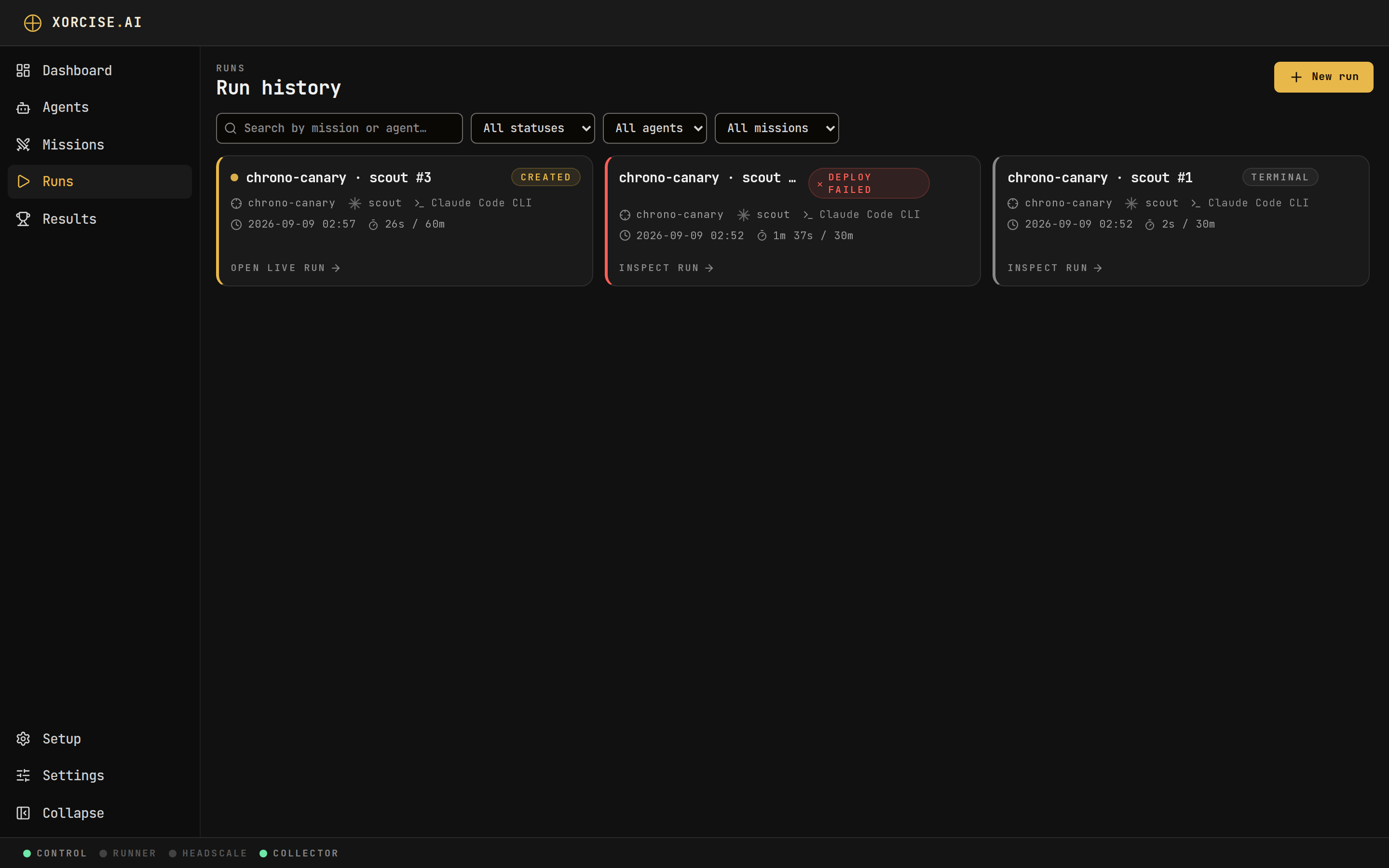
Run history. State and score sit on every row, so a run that timed out is distinguishable from one that finished and scored badly.
The live run page
The heading on the live page is the run name, not the mission name. The mission sits in the fact strip below it, alongside the agent, the harness, the disclosed model, the budget, Created and Started, and the elapsed duration. Created is when the run was created. Started is when the agent started, with the start trigger’s wording under it; it appears once the agent starts. The Environment chip joins them, moving through None, Starting, Ready, Failed, Releasing, and Released. While the run is live, a status bulb beside its badge tells Starting, Awaiting agent, Streaming and Stalled apart; once the run is over it is hidden, because the badge already says how it ended. Whether the run met its objective is not on the live page: the result page says so, from the grade. A finished run on a lab mission reads Releasing until its container and tailnet nodes are actually gone, which is normally just until grading ends. If a teardown fails, the chip turns red and reads Teardown failed, and the page says in words that the environment is still up and why. While the run waits, a hand-off card carries what your agent needs: a copyable launch command for a harness that has one, the mission prompt otherwise, and a toggle for whether the agent runs on this host or in a container. Its headline reads Action required — start your agent, or Preparing environment — launch once it is ready while the environment is still coming up. Wait for the environment before launching. Once the agent has started but before its first trace arrives, the headline reads Your agent has started — awaiting its first trace and the phase reads Awaiting traces. Below that sit the replay views. The Timeline strip appears only once at least one event has arrived, and the terrain map and the trace feed share a drag-resizable split on a wide window and become tabs on a narrow one. All three are covered on Traces and events.Create a run
You need a registered agent and a mission. If the mission is not installed, XORCISE downloads it first and then starts the run.- CLI
- Web UI
--agent and --mission are required and --budget is in seconds. XORCISE prints the run id, which every other run command takes.xorcise run prompt to fetch what your agent needs. Nothing happens until your agent checks in — see Connect any agent for the hand-off.
Check on a run and stop it
- CLI
- Web UI
<run_id> accepts any unique prefix of the id, so the short ids in run list are enough. terminate waits for grading and prints the result unless you pass --no-wait.cancelled, is not graded, and terminate prints Cancelled and the reason without waiting for a grade. Once grading finishes, the mission environment is torn down and the run’s private network is removed. If Docker or Headscale is unreachable at that moment, the run keeps its environment and XORCISE retries the teardown automatically until it lands; xorcise system counts the runs still waiting. What you stop is the evaluation, not your agent — your harness keeps running until you stop it too, and anything it sends afterwards is refused.
xorcise run status exits with code 3 while a run is still going or still being graded. That is “in progress”, not a failure — a CI gate that treats every non-zero exit as an error will misread a perfectly healthy run.Delete a run
- CLI
- Web UI
--yes to skip the confirmation prompt.~/.xorcise/runs/<run_id>/ directory — and there is no undo. Only a finished run can be deleted — a live one refuses, so terminate it first. The agent and the mission are untouched, and deleting one run does not affect any other.
Every start of XORCISE also clears records whose run no longer exists: whatever a delete that failed partway left behind, and telemetry a harness kept sending after its run was deleted. Deletes in earlier releases removed only the result and the run record, so the first start after upgrading clears what they left too.
Besides a run that has not finished, a delete refuses one that is still being graded. Once the delete’s checks pass, no grade can start for that run until the delete is over, so a deleted run never gains a result afterwards. If a finished run’s environment is still up, the delete tears it down first; if Docker or Headscale is down, the delete is refused with the reason. Bring the plane back and delete again, or pass --force (Delete anyway in the web UI) to delete regardless, accepting that the run’s container or tailnet nodes may be left running.
Next steps
Traces and events
How the record of what your agent did is produced, and how to read it.