

xorcise up creates everything it needs and never overwrites what you have edited, which leaves a short list of things you actually set: a judge model, optionally a terrain model, the mission library switch, and ports if the defaults collide.
What the first start creates
xorcise up checks its prerequisites before it writes anything, then bootstraps in order: it creates ~/.xorcise, scaffolds config.toml and a .env file at mode 0600, brings a fresh database to the current schema, provisions a local Headscale control plane with a self-signed TLS certificate, and starts the brain. Re-running up repeats the same path harmlessly — a scaffold is never overwritten, and provisioning is idempotent, so up also repairs a control plane whose containers disappeared after a reboot.
Everything lands under ~/.xorcise, or under XORCISE_HOME if you set it before starting:
One file in there is load-bearing and unmarked:
headscale/.owned. It is the only thing that tells xorcise down that the running Headscale container and its volume belong to XORCISE. Delete it by hand and those resources are orphaned permanently — nothing will ever clean them up.
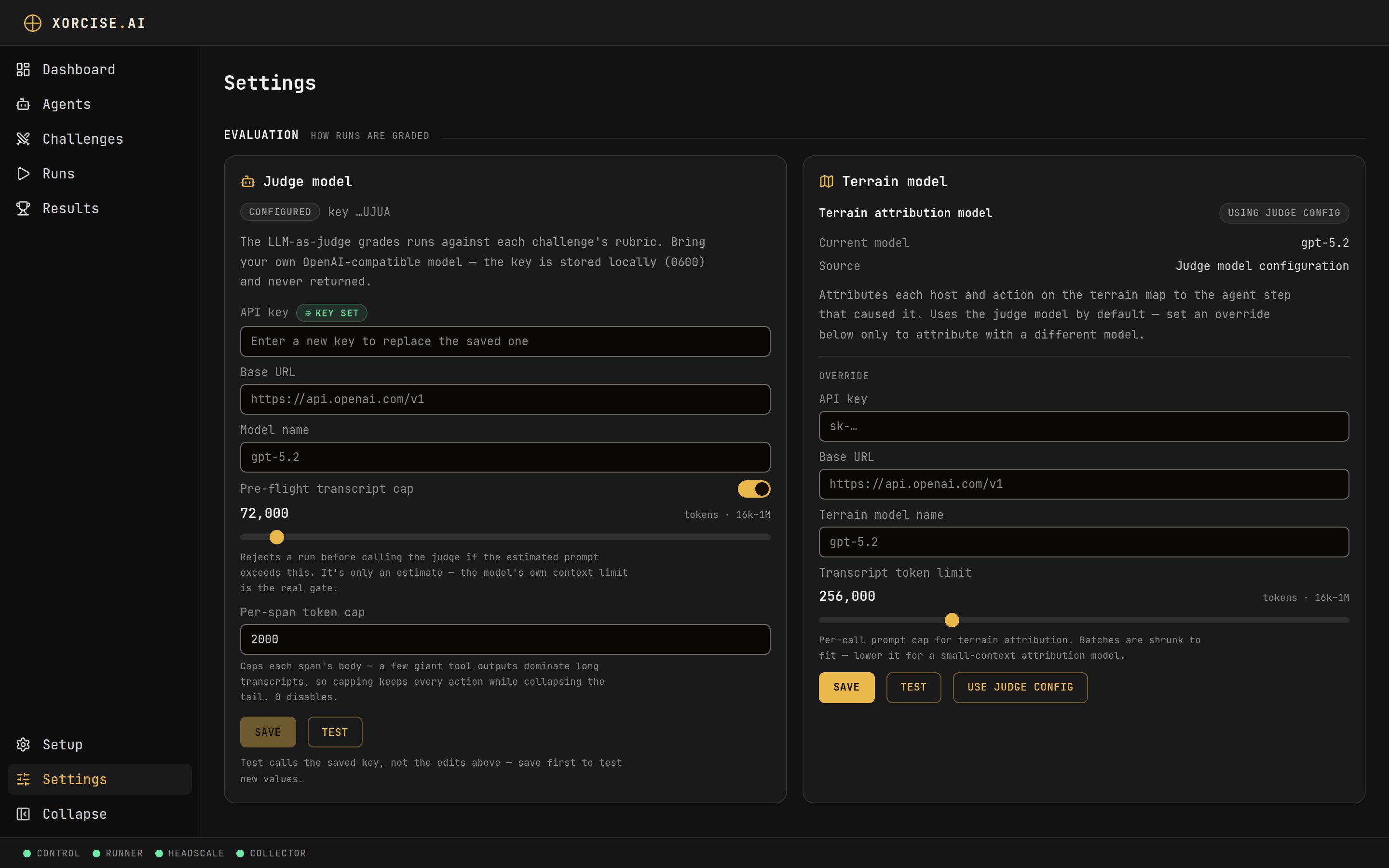
The Settings page. Everything editable here is written to ~/.xorcise/.env, never to config.toml.
Where configuration lives
Four sources feed one settings object. Highest wins:.env, not config.toml. And a XORCISE_* variable exported in your shell beats anything either file says, including for a CLI that is only talking to an already-running brain.
The Settings page never writes config.toml. Every value it can change is written to ~/.xorcise/.env as a XORCISE_MODEL_*, XORCISE_JUDGE_*, XORCISE_TERRAIN_*, or XORCISE_CATALOG_ENABLED variable, and the file is re-chmoded to 0600 on every write. config.toml is world-readable and holds only non-secret shape, which is why the two are kept apart.
The page groups its cards under three headings: Evaluation for how runs are graded, Mission Library & Runtime for the catalog and your environment, and Diagnostics for system health and connection. Every field name below matches a card in one of those groups. For the exhaustive list of keys, types, defaults, and their environment-variable names, see Configuration keys.
Configure the judge model
The judge produces half of every score, and XORCISE ships no model. Bring your own OpenAI-compatible endpoint and key. Grading sends the distilled transcript of a run to whatever provider you point it at, so this is the setting that decides where your run content goes.- CLI
- Web UI
--key-stdin keeps the key off the command line. On a terminal it prompts for the key and does not echo what you type; in a script or CI it reads a pipe instead, as in printf %s "$KEY" | xorcise config set-model --key-stdin. --key <value> still works, but it leaves the key in your shell history and in the process list while the command runs — see Where secrets live.Only the fields you pass change, and --key '' clears the key. Passing no options at all is a usage error rather than a silent no-op.xorcise config test calls the model and exits non-zero when it cannot, so it can gate a script, and the Test button on the card does the same thing. Test uses the saved key, not unsaved edits, so save first.
The test sends the same order of message roles as a real grading call, so a self-hosted server whose chat template would refuse the judge’s role order fails the test as well. Its prompt is a few words, though, so it cannot tell you whether a long run fits the model’s context window — Bound the judge prompt covers that.
The key is write-only. Reading configuration back — over the API, in the UI, or with
xorcise config show — returns only a four-character hint, never the key itself.Bound the judge prompt
A long lab run can produce a judge prompt larger than the model’s context window, at which point the judge half is unreachable and the score degrades to deterministic-only. Two caps exist for exactly that failure, and they are the controls to reach for before you change models. The per-span cap defaults to 2000 tokens. It trims each span’s body to a head-and-tail window with a marker in between, so every action survives while a few enormous tool outputs stop dominating the transcript. Setting it to0 disables trimming.
The pre-flight transcript cap is off by default. Turned on, it rejects a run before the judge is called if the estimated prompt exceeds the ceiling. It is off deliberately: the local count is an estimate, so XORCISE prefers to let the call go through and surface the provider’s real error than to reject a prompt that would have fit.
- CLI
- Web UI
--transcript-max-tokens 0 to turn the pre-flight cap back off.Configure the terrain model
Terrain attribution maps each host and action on the terrain map back to the agent step that caused it, and it does that with a model call. By default it reuses your judge model and needs no configuration of its own. Override it only when you want attribution on a different model — each field you leave unset keeps falling back to the judge’s.- CLI
- Web UI
xorcise config test-terrain to call whichever model is currently effective.Connect the mission library
The hosted XORCISE library is free and needs no API key, account, or sign-in of any kind — the client sends no credential. Acatalog_key setting exists and is read by nothing. Connecting it makes library missions appear in the catalog and pullable on demand, including automatically at run start; pulling one contacts the hosted catalog and a container registry, and sends nothing about your runs.
While connected, the web UI also shows the announcements XORCISE Remote publishes, such as a maintenance window, an incident affecting pulls, or the all-clear afterwards. One banner can sit below the header on every page, and another inside the XORCISE Remote tab on the Missions page. Each names its kind in text: Information, Maintenance, Incident or Resolved. Most have a close button, and closing one is remembered in that browser until the announcement is edited; an incident never has one. The UI asks for announcements once when you open or reload it, not as you move between pages, and never polls, so a new or withdrawn banner reaches a tab that is already open only when you reload it. Disconnecting stops the announcement check too, and a banner already on screen stays until the next reload. What leaves your machine sets out what the check sends.
- CLI
- Web UI
xorcise catalog disconnect to turn it off and xorcise catalog status to check it.xorcise catalog status reports the saved setting and a live probe as two separate lines, and a saved preference is never reported as a verified connection. Disconnected means an empty remote library, not a stubbed one — your own ingested missions are unaffected.
Change ports
XORCISE binds two planes: the REST API and web UI on3001, and the OpenTelemetry receiver on 4318. There is no third plane. If a port is busy, up scans up to 50 ports above it, moves, and prints a notice per move — so read the address up prints rather than assuming the default.
To pin different ports, set them before starting — as a flag on up, or as keys in ~/.xorcise/config.toml, which is a flat file whose keys are the setting names:
xorcise status and xorcise ui keep working without being told. There is no web UI equivalent.
Work behind an HTTP proxy
XORCISE never sends a request for its own local services through a proxy. The CLI’s calls to the server, the probes behindstatus, ui, doctor, up and down, and the server’s probes of its own planes all ignore HTTP_PROXY, HTTPS_PROXY and ALL_PROXY, so you need no NO_PROXY entry for them.
Requests that leave this host do use those variables, whichever XORCISE process makes them: the mission library at catalog_url, your judge and terrain model provider, the Tailscale client download, the PyPI check behind the update notice up prints (set XORCISE_NO_UPDATE_CHECK=1 to opt out of it), and a control plane you set yourself in headscale_url. The server makes most of them, and it keeps the environment of the shell that ran xorcise up, so set the proxy there before you start it. Mission images are pulled by the Docker daemon, which uses its own proxy configuration rather than your shell’s. Your agent’s OTLP exporter is not part of XORCISE: whether it sends telemetry to the collector through a proxy depends on the agent’s own settings.
Check your install
Three questions have three different answers: are the prerequisites on this host satisfied, are the ports answering, and what does the running instance believe about itself.- CLI
- Web UI
doctor checks prerequisites and prints an exact fix per failure. xorcise status probes the REST plane, the OTLP plane, and the Docker daemon. xorcise system asks the running instance what it sees, including its role, topology, and database schema.Upgrade XORCISE
up brings a schema-less database to the current version, but it will not migrate a database that already has data. That refusal is deliberate: migrating populated data stays an explicit decision, so up stops with database is behind the schema instead of touching your runs.
Stop XORCISE before you migrate. Migrating rebuilds tables the running server has open, so xorcise db upgrade refuses with exit 1 while a server of this home is running, whether it finds one by the pid file or by asking the REST port. The error names the server and tells you to run xorcise down first. --force migrates anyway, which is unsafe while a server is using the database.
~/.xorcise is destroyed by any of that — the package upgrade touches only site-packages, and up re-renders the Headscale config and re-provisions its container idempotently. Each XORCISE release runs the one Headscale release it was built against, pinned by digest, and up pulls it from Docker Hub the first time it is missing. On a host with no registry access, pull it on one that has access, docker save it, and docker load it on the host first; up names the image when it cannot pull it. XORCISE 0.2.1 pins headscale/headscale:v0.29.5. Run xorcise db upgrade only when up tells you the database is behind; there is no downgrade path, so back up the database before rolling a version back.
If the migration fails with migration history mismatch, the database was stamped by a different build of XORCISE. Back up the database, then either run the build that created it or re-initialise from scratch.
Back up and restore the database
xorcise.db holds every agent, run, result, grade and raw trace, and it is not always one self-contained file. While XORCISE runs, SQLite can be partway through writing it, and recent writes can sit in a sidecar file beside it — xorcise.db-wal, or xorcise.db-journal after an interrupted write — rather than in xorcise.db itself. A plain copy of xorcise.db alone can therefore miss data or catch the file half-written. The paths below assume the default home; substitute yours if you set XORCISE_HOME.
While XORCISE is running, use SQLite’s own backup. It takes a consistent copy without stopping anything, and needs only the Python standard library:
xorcise-backup.db to the current directory. It opens the database read-only, so a wrong path fails with unable to open database file instead of backing up a new, empty database. If you have the sqlite3 command-line tool, sqlite3 ~/.xorcise/xorcise.db ".backup xorcise-backup.db" does the same.
With XORCISE stopped (xorcise down), an ordinary copy works, as long as it takes xorcise.db together with any xorcise.db-wal or xorcise.db-journal beside it.
To restore:
- Stop XORCISE with
xorcise down. - Delete
xorcise.db-wal,xorcise.db-shmandxorcise.db-journalfrom~/.xorcise, whichever exist. - Copy your backup into place as
~/.xorcise/xorcise.db. If you copied a sidecar alongside it, put that back too, renamed to match. - Start XORCISE with
xorcise up.
.env holds your model keys and missions/ your installed missions; back those up with an ordinary copy, and keep in mind that a copy of .env holds the keys in cleartext.
Uninstall XORCISE
Order matters here, and getting it wrong leaves Docker resources behind with nothing left on the machine that knows how to find them.~/.xorcise. Doing it after pip uninstall is not possible.
The purge does not remove mission images. To reclaim that space too, do it first, while XORCISE is still running. Uninstall each mission with xorcise mission delete <id> --purge, then run xorcise mission prune --yes to remove the images that are left, such as older versions from updates. Do not use docker system prune -a for this. It removes every unused image on the host, not only XORCISE’s.
Related pages
Configuration keys
Every setting, its type, default, and environment variable.
Troubleshooting
Symptom-first fixes for start, run, and grading failures.